msx-knowledge-base
Number Inline Expressions
It is possible to convert numbers (indicated in milliseconds) with inline expressions into date, time, or duration values. The expressions are similar to the Live Inline Expressions and look like this: {num:{NUMBER}:{TYPE}:{FORMAT}}. It is also possible to add colored values with the expression syntax {txt:{COLOR}:num:{NUMBER}:{TYPE}:{FORMAT}}. Please see Colors for possible color values. This feature is available since version 0.1.91. Since version 0.1.160, a number can also be basically formatted by using the syntax {num:{NUMBER}:format} or {num:{NUMBER}:format:{FORMAT}}. In the first case, the number format is taken from the dictionary. Please see Basic Number Format Expressions for examples.
Date, time, duration formats and formatter IDs are identical to the Live Inline Expressions. The examples below only show a few; the complete vocabulary lives on that page and applies unchanged to
{num:…}:
date:{FORMAT}→ Live Date Format (e.g.DD, MM d, yyyy)time:{FORMAT}→ Live Time Format (e.g.h:mm/ampm)duration:time:{FORMAT}→ Live Duration Format (e.g.hh:mm:ss)duration:text:{FORMAT}→ Live Duration Text (e.g.dhms)formatter:{FORMATTER_ID}→ all 14 Live Formatter IDs (time,time_long,time_day,time_day_long,day,day_long,day_full,day_time,day_time_long,day_time_full,date,date_long,date_time,date_time_long) — not justday_full.
Basic Number Format Expressions
Expression syntax of basic number format expressions.
| Expression | Example | Output | Since Version |
|---|---|---|---|
{num:{NUMBER}:format} |
{num:123:format}{num:1234:format}{num:12345.12345:format} |
1231,23412,345.12345 |
0.1.160 |
{num:{NUMBER}:format:{DECIMAL_DIGITS}}{num:{NUMBER}:format:{DECIMAL_DIGITS}{DECIMAL_TRIMMING}} |
{num:123:format:0}{num:123:format:1}{num:123:format:2}{num:123:format:02}{num:123:format:12}{num:123:format:21}{num:1234.1:format:0}{num:1234.1:format:1}{num:1234.1:format:3}{num:1234.1:format:03}{num:1234.1:format:23}{num:1234.1:format:32}{num:12345.12345:format:0}{num:12345.12345:format:1}{num:12345.12345:format:4}{num:12345.12345:format:04}{num:12345.12345:format:24}{num:12345.12345:format:42} |
123123.0123.00123123.0123.001,2341,234.11,234.1001,234.11,234.101,234.10012,34512,345.112,345.123412,345.123412,345.123412,345.1200 |
0.1.160 |
{num:{NUMBER}:format:{THOUSANDS_SEPARATOR}}{num:{NUMBER}:format:{THOUSANDS_SEPARATOR}{DECIMAL_SEPARATOR}}{num:{NUMBER}:format:{THOUSANDS_SEPARATOR}{DECIMAL_SEPARATOR}{DECIMAL_DIGITS}}{num:{NUMBER}:format:{THOUSANDS_SEPARATOR}{DECIMAL_SEPARATOR}{DECIMAL_DIGITS}{DECIMAL_TRIMMING}} |
{num:12345.12345:format:.,}{num:12345.12345:format: .}{num:12345.12345:format: ,}{num:12345.12345:format:.,0}{num:12345.12345:format: .1}{num:12345.12345:format: ,24} |
12.345,1234512 345.1234512 345,1234512.34512 345.112 345,1234 |
0.1.160 |
Example
Screenshot
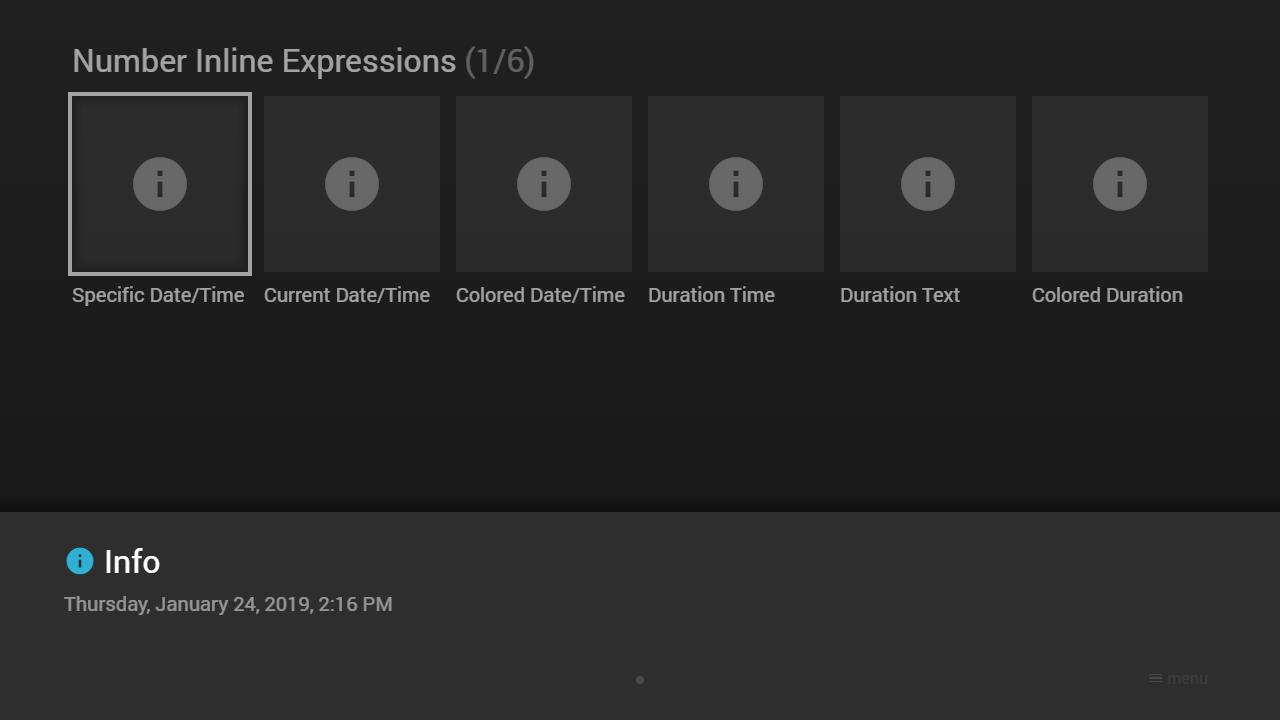
Code
{
    "type": "pages",
    "headline": "Number Inline Expressions",
    "template": {
        "type": "separate",
        "layout": "0,0,2,3",
        "icon": "msx-white-soft:info",
        "color": "msx-glass"
    },
    "items": [{
            "title": "Specific Date/Time",
            "action": "info:{num:1548335764000:date:DD, MM d, yyyy}, {num:1548335764000:time:h:mm/ampm}"
        }, {
            "title": "Current Date/Time",
            "action": "info:{num:now:date:DD, MM d, yyyy}, {num:now:time:h:mm/ampm}"
        }, {
            "title": "Colored Date/Time",
            "action": "info:{txt:msx-blue:num:1548335764000:date:DD, MM d, yyyy}, {txt:msx-blue:num:1548335764000:time:h:mm/ampm}"
        }, {
            "title": "Duration Time",
            "action": "info:{num:5640000:duration:time:hh:mm:ss}"
        }, {
            "title": "Duration Text",
            "action": "info:{num:5640000:duration:text:dhms}"
        }, {
            "title": "Colored Duration",
            "action": "info:{txt:msx-blue:num:5640000:duration:text:dhms}"
        }, {
            "badge": "Formatter",
            "title": "Specific Date/Time",
            "titleFooter": "0.1.160+",
            "action": "info:{num:1548335764000:formatter:day_full}"
        }, {
            "badge": "Formatter",
            "title": "Current Date/Time",
            "titleFooter": "0.1.160+",
            "action": "info:{num:now:formatter:day_full}"
        }, {
            "badge": "Formatter",
            "title": "Colored Date/Time",
            "titleFooter": "0.1.160+",
            "action": "info:{txt:msx-blue:num:1548335764000:formatter:day_full}"
        }, {
            "badge": "Format",
            "title": "Default Number",
            "titleFooter": "0.1.160+",
            "action": "info:{num:12345.12345:format}"
        }, {
            "badge": "Format",
            "title": "Rounded Number",
            "titleFooter": "0.1.160+",
            "action": "info:{num:12345.12345:format:0}"
        }, {
            "badge": "Format",
            "title": "Colored Number",
            "titleFooter": "0.1.160+",
            "action": "info:{txt:msx-blue:num:12345.12345:format: ,24}"
        }]
}
Demo
See Also
- Cookbook → Deep dive — the TV Guide (EPG grid) backend — real fixed-timestamp slot headers built with
{num:...:date:...}/{num:...:time:...}