msx-knowledge-base
Tizen Player
The Tizen player is used in Media Station X version 0.1.128 or higher for all Samsung TVs (2016+ models). In previous versions, the HTML5 player is used. The Tizen player works similar to the HTML5 player, but supports more video formats (e.g. 4k/8k formats) and can be configured via the Extended Properties of a content item to setup display, buffer, and/or stream settings. Additionally, you can interact with it using the player:commit actions to get the current stream information and/or to select a specific audio/text track. Please see Runtime Usage for more information. Some extended properties are dynamic and can also be set via an action at runtime.
Most of the extended properties are directly mapped to a corresponding Tizen (i.e. AVPlay API) function. For more information, please visit following links.
AVPlayAPI: https://developer.samsung.com/smarttv/develop/api-references/samsung-product-api-references/avplay-api.html- Using
AVPlay: https://developer.samsung.com/smarttv/develop/guides/multimedia/media-playback/using-avplay.html
Note: All properties are reset if a new video/audio is played. Please also note that you can still use the HTML5 player with a plugin (see Video/Audio Plugin). It should be mentioned here that setting the speed only works with the HTML5 player, because the AVPlay API does not support the required speed values.
Syntax
Property syntax of extended properties for Tizen player.
| Property | Value | Example | Tizen Function | Dynamic | Since Version | Description |
|---|---|---|---|---|---|---|
tizen:buffer:size |
{SECONDS} |
"tizen:buffer:size": "10" |
setBufferingParam("PLAYER_BUFFER_FOR_PLAY", "PLAYER_BUFFER_SIZE_IN_SECOND", {SECONDS});setBufferingParam("PLAYER_BUFFER_FOR_RESUME", "PLAYER_BUFFER_SIZE_IN_SECOND", {SECONDS}); |
No | 0.1.128 | Sets up the initial and resume buffer size in seconds. The default buffer size is "10". Please see AVPlay API for possible values. |
tizen:buffer:size:init |
{SECONDS} |
"tizen:buffer:size:init": "10" |
setBufferingParam("PLAYER_BUFFER_FOR_PLAY", "PLAYER_BUFFER_SIZE_IN_SECOND", {SECONDS}); |
No | 0.1.128 | Sets up the initial buffer size in seconds. The default buffer size is "10". Please see AVPlay API for possible values. |
tizen:buffer:size:resume |
{SECONDS} |
"tizen:buffer:size:resume": "10" |
setBufferingParam("PLAYER_BUFFER_FOR_RESUME", "PLAYER_BUFFER_SIZE_IN_SECOND", {SECONDS}); |
No | 0.1.128 | Sets up the resume buffer size in seconds. The default buffer size is "10". Please see AVPlay API for possible values. |
tizen:buffer:timeout |
{SECONDS} |
"tizen:buffer:timeout": "20" |
setTimeoutForBuffering({SECONDS}); |
Yes | 0.1.128 | Sets up the buffer timeout in seconds. The default buffer timeout is "20". Please see AVPlay API for possible values. |
tizen:display:area |
{REL_X},{REL_Y},{REL_W},{REL_H} |
"tizen:display:area": "0,0,1,1""tizen:display:area": "0.125,0,0.75,1""tizen:display:area": "0,0.119,1,0.762" |
setDisplayRect({ABS_X}, {ABS_Y}, {ABS_W}, {ABS_H}); |
Yes | 0.1.128 | Sets up the display area with relative coordinates. The default area is "0,0,1,1", which fills the entire screen. Please see AVPlay API for possible values.Note: If this property is set, the property tizen:display:mode will be set to "PLAYER_DISPLAY_MODE_FULL_SCREEN", which fills the entire area (by stretching the video image). |
tizen:display:mode |
{DISPLAY_MODE} |
"tizen:display:mode": "PLAYER_DISPLAY_MODE_LETTER_BOX""tizen:display:mode": "PLAYER_DISPLAY_MODE_FULL_SCREEN""tizen:display:mode": "PLAYER_DISPLAY_MODE_AUTO_ASPECT_RATIO" |
setDisplayMethod({DISPLAY_MODE}); |
Yes | 0.1.128 | Sets up the display mode. The default mode is "PLAYER_DISPLAY_MODE_LETTER_BOX", which fills the entire screen (by keeping the video aspect ratio). Please see AVPlay API for possible values.Note: If this property is set, the property tizen:display:area will be set to "0,0,1,1". |
tizen:load |
{ACTION} |
"tizen:load": "info:Tizen player loaded." |
n/a | No | 0.1.128 | Sets up an action that is executed if the player is loaded (i.e. the internal state is "IDLE"). Please see AVPlay API for more information. |
tizen:ready |
{ACTION} |
"tizen:ready": "info:Tizen player ready." |
n/a | Yes | 0.1.128 | Sets up an action that is executed if the player is ready (i.e. the internal state is "READY"). Please see AVPlay API for more information. |
tizen:start |
{ACTION} |
"tizen:start": "info:Tizen player started." |
n/a | Yes | 0.1.128 | Sets up an action that is executed if the player is started (i.e. the internal state is "PLAYING" or "PAUSED"). Please see AVPlay API for more information. |
tizen:stream:{STREAM_TYPE} |
{STREAM_VALUE} |
"tizen:stream:PREBUFFER_MODE": "5000""tizen:stream:ADAPTIVE_INFO": "FIXED_MAX_RESOLUTION=7680X4320""tizen:stream:ADAPTIVE_INFO": "BITRATES=5000~10000\|STARTBITRATE=HIGHEST\|SKIPBITRATE=LOWEST" |
setStreamingProperty({STREAM_TYPE}, {STREAM_VALUE}); |
No | 0.1.128 | Sets up a stream specific property. Please see AVPlay API for possible values. |
tizen:subtitle:delay |
{MILLISECONDS} |
"tizen:subtitle:delay": "500" |
setSubtitlePosition({MILLISECONDS}); |
Yes | 0.1.141 | Sets up a subtitle delay in milliseconds to adjust the synchronization with the video/audio. The default delay is "0". Please see AVPlay API for more information. |
tizen:subtitle:hidden |
{BOOLEAN_VALUE} |
"tizen:subtitle:hidden": "true" |
n/a | Yes | 0.1.145 | Shows/Hides the in-app subtitles. The default value is "false". |
tizen:subtitle:silent |
{BOOLEAN_VALUE} |
"tizen:subtitle:silent": "true" |
setSilentSubtitle({BOOLEAN_VALUE}); |
Yes | 0.1.141 | Shows/Hides the subtitles. The default value is "false". Please see AVPlay API for more information.Note: If the tizen:subtitle:url or tizen:track:text property is set, this property will be set to "false". |
tizen:subtitle:style:color |
{STYLE_COLOR} |
"tizen:subtitle:style:color": "white""tizen:subtitle:style:color": "yellow""tizen:subtitle:style:color": "black" |
n/a | Yes | 0.1.153 | Sets up the in-app subtitle style color. The default value is "white". |
tizen:subtitle:style:size |
{STYLE_SIZE} |
"tizen:subtitle:style:size": "extra-small""tizen:subtitle:style:size": "small""tizen:subtitle:style:size": "medium""tizen:subtitle:style:size": "large""tizen:subtitle:style:size": "extra-large" |
n/a | Yes | 0.1.153 | Sets up the in-app subtitle style size. The default value is "medium". |
tizen:subtitle:style:type |
{STYLE_TYPE} |
"tizen:subtitle:style:type": "border""tizen:subtitle:style:type": "shadow""tizen:subtitle:style:type": "box" |
n/a | Yes | 0.1.153 | Sets up the in-app subtitle style type. The default value is "border". |
tizen:subtitle:type |
{SUBTITLE_TYPE} |
"tizen:subtitle:type": "html""tizen:subtitle:type": "plain" |
n/a | Yes | 0.1.145 | Sets up the in-app subtitle type. By default, Samsung TVs provide subtitles in the HTML format, therefore, the default type is "html" (which means that subtitles will not be HTML-escaped). However, it is not clear whether this applies to all subtitle files and all TV models. Therefore, it is also possible to set the type to "plain" (which means that subtitles will be HTML-escaped). |
tizen:subtitle:url |
{SUBTITLE_URL} |
"tizen:subtitle:url": "http://msx.benzac.de/media/sintel/en.srt" |
setExternalSubtitlePath({SUBTITLE_FILE}); |
Yes | 0.1.141 | Sets up an external subtitle file. Please see AVPlay API for more information.Note: Subtitle files should be specified in the SubRip Text (SRT) format. |
tizen:track:audio |
{TRACK_INDEX} |
"tizen:track:audio": "1" |
setSelectTrack("AUDIO", {TRACK_INDEX}); |
Yes | 0.1.128 | Selects an audio track by indicating the index. Please see AVPlay API for more information. |
tizen:track:text |
{TRACK_INDEX} |
"tizen:track:text": "1" |
setSelectTrack("TEXT", {TRACK_INDEX}); |
Yes | 0.1.128 | Selects a text track by indicating the index. Please see AVPlay API for more information. |
Runtime Usage
It is possible to request data from the Tizen player (e.g. from an interaction plugin) and/or to set some extended properties via an action at runtime.
Actions
Action syntax for Tizen player. Because the player:commit action requires a JSON data block, all actions are listed as labeled entries below.
Syntax & Example: player:commit:message:{PROPERTY}:{VALUE}
player:commit:message:tizen:buffer:timeout:20player:commit:message:tizen:display:area:0,0,1,1player:commit:message:tizen:subtitle:hidden:trueplayer:commit:message:tizen:subtitle:silent:trueplayer:commit:message:tizen:subtitle:style:size:largeplayer:commit:message:tizen:subtitle:url:http://msx.benzac.de/media/sintel/en.srtplayer:commit:message:tizen:track:audio:1player:commit:message:tizen:track:text:1
Data: n/a
Tizen Function: n/a
Since Version: 0.1.128
Description: Sets up an extended property during runtime.
Note: Only the dynamic properties can be set at runtime.
Please see Syntax for more information.
Syntax & Example: player:commit
Data:
{
   "key": "{PROPERTY}",
   "value": "{VALUE}",
   "action": "{ACTION}",
   "data": null
}
Tizen Function: n/a
Since Version: 0.1.128
Description: Sets up an extended property during runtime and optionally executes an action on completion.
Note: Only the dynamic properties can be set at runtime.
Please see Syntax for more information.
Syntax & Example:
interaction:commit:response:request:player:tizen:infointeraction:commit:response:request:player:tizen:info:baseinteraction:commit:response:request:player:tizen:info:displayinteraction:commit:response:request:player:tizen:info:bufferinteraction:commit:response:request:player:tizen:info:subtitleinteraction:commit:response:request:player:tizen:info:streaminteraction:commit:response:request:player:tizen:info:tracks
Data: n/a
Tizen Function:
getVersion();getState();getCurrentStreamInfo();getTotalTrackInfo();
Since Version: 0.1.128
Description: Requests info data from the player and commits the response to an interaction plugin. Please see AVPlay API for more information. For the response data structure, please see Response Examples.
Syntax & Example: interaction:commit:response:request:player:tizen:property:{STREAM_TYPE}
interaction:commit:response:request:player:tizen:property:IS_LIVEinteraction:commit:response:request:player:tizen:property:AVAILABLE_BITRATEinteraction:commit:response:request:player:tizen:property:GET_LIVE_DURATIONinteraction:commit:response:request:player:tizen:property:CURRENT_BANDWIDTH
Data: n/a
Tizen Function: getStreamingProperty({STREAM_TYPE});
Since Version: 0.1.128
Description: Requests a stream specific property from the player and commits the response to an interaction plugin. Please see AVPlay API for more information. For the response data structure, please see Response Examples.
Syntax & Example: interaction:commit:response:request:player:tizen:properties:{STREAM_TYPE}|{STREAM_TYPE}|{STREAM_TYPE}
interaction:commit:response:request:player:tizen:properties:IS_LIVE|AVAILABLE_BITRATE|GET_LIVE_DURATION
Data: n/a
Tizen Function: getStreamingProperty({STREAM_TYPE});
Since Version: 0.1.128
Description: Requests multiple stream specific properties from the player and commits the response to an interaction plugin. Please see AVPlay API for more information. For the response data structure, please see Response Examples.
Response Examples
Note: Please note that no action-related data property is used for all response examples. Therefore, the committed data property is always null.
Action: interaction:commit:response:request:player:tizen:info
Response:
{
    "response": {
        "tizen": {
            "info": {
                "version": "1.0",
                "state": "PLAYING",
                "display": {
                    "area": "0,0,1,1",
                    "mode": "PLAYER_DISPLAY_MODE_LETTER_BOX"
                },
                "buffer": {
                    "timeout": 20,
                    "size": {
                        "init": 10,
                        "resume": 10
                    }
                },
                "subtitle": {
                    "delay": 0,
                    "silent": false,
                    "hidden": false,
                    "type": "html",
                    "style": {
                        "size": "medium",
                        "color": "white",
                        "type": "border"
                    },
                    "url": null
                },
                "stream": {
                    "video": {
                        "index": 0,
                        "info": {
                            "fourCC": "H264",
                            "Width": 1920,
                            "Height": 1080,
                            "Bit_rate": 477000
                        }
                    },
                    "audio": {
                        "index": 1,
                        "info": {
                            "language": "eng",
                            "channels": 2,
                            "sample_rate": 44100,
                            "bit_rate": 96000,
                            "fourCC": "AACL"
                        }
                    },
                    "text": {
                        "index": 2,
                        "info": {
                            "track_num": 0,
                            "track_lang": "eng",
                            "subtitle_type": -1,
                            "fourCC": "TTML"
                        }
                    }
                },
                "tracks": {
                    "video": [{
                            "index": 0,
                            "info": {
                                "fourCC": "H264",
                                "Width": 1920,
                                "Height": 1080,
                                "Bit_rate": 477000
                            }
                        }],
                    "audio": [{
                            "index": 1,
                            "info": {
                                "language": "eng",
                                "channels": 2,
                                "sample_rate": 44100,
                                "bit_rate": 96000,
                                "fourCC": "AACL"
                            }
                        }],
                    "text": [{
                            "index": 2,
                            "info": {
                                "track_num": 0,
                                "track_lang": "eng",
                                "subtitle_type": -1,
                                "fourCC": "TTML"
                            }
                        }]
                }
            }
        }
    },
    "error": null,
    "data": null
}
Action: interaction:commit:response:request:player:tizen:property:IS_LIVE
Response:
{
    "response": {
        "tizen": {
            "property": {
                "type": "IS_LIVE",
                "value": "0"
            }
        }
    },
    "error": null,
    "data": null
}
Action: interaction:commit:response:request:player:tizen:properties:IS_LIVE|AVAILABLE_BITRATE|GET_LIVE_DURATION
Response:
{
    "response": {
        "tizen": {
            "properties": [{
                    "type": "IS_LIVE",
                    "value": "0"
                }, {
                    "type": "AVAILABLE_BITRATE",
                    "value": ""
                }, {
                    "type": "GET_LIVE_DURATION",
                    "value": ""
                }]
        }
    },
    "error": null,
    "data": null
}
Example
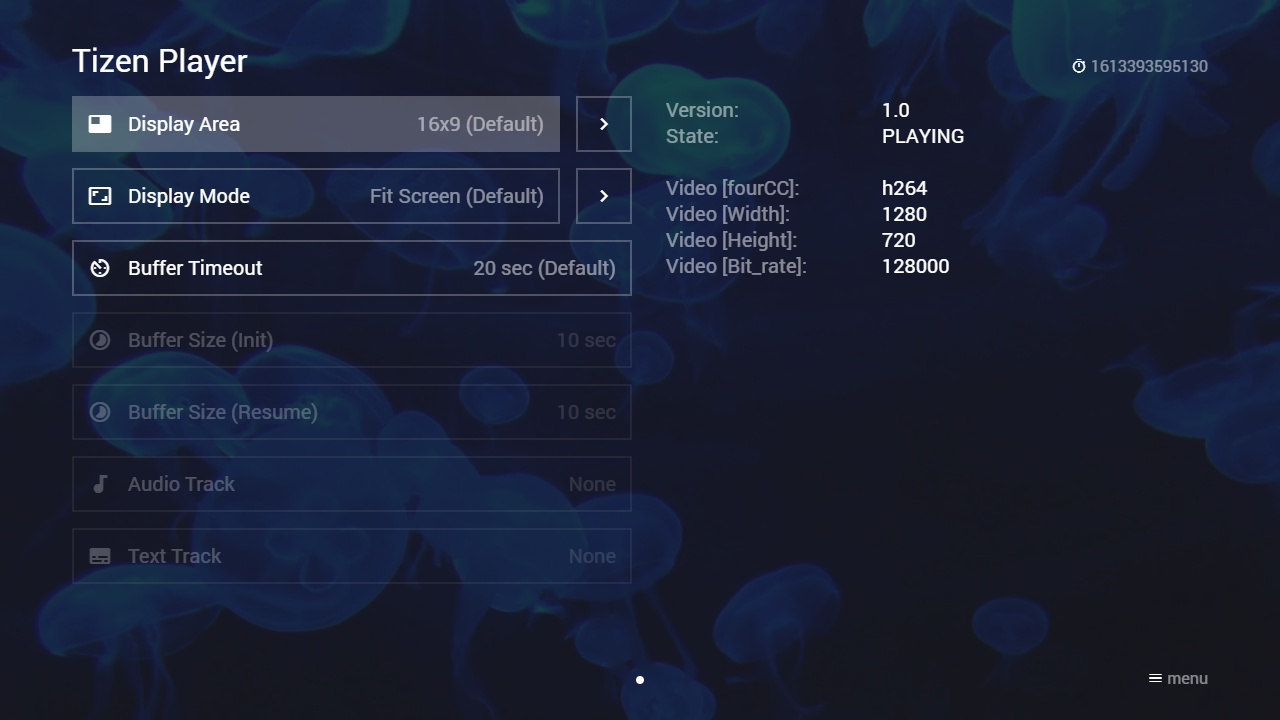
This example uses an interaction plugin to interact with the Tizen player. You can use it as is or integrate it into your existing interaction plugin. Please have a look at following implementation scripts.
Screenshot
Code
{
    "type": "list",
    "headline": "Tizen Player Test",
    "template": {
        "type": "separate",
        "layout": "0,0,2,4",
        "color": "msx-glass",
        "properties": {
            "tizen:buffer:size": "10",
            "tizen:buffer:timeout": "20",
            "tizen:load": "logger:debug:Tizen player loaded.",
            "tizen:ready": "logger:debug:Tizen player ready.",
            "tizen:start": "logger:debug:Tizen player started.",
            "button:content:icon": "build",
            "button:content:action": "content:request:interaction:init@http://msx.benzac.de/interaction/tizen.html"
        }
    },
    "items": [{
            "icon": "msx-white-soft:movie",
            "title": "Video 1",
            "playerLabel": "Video 1",
            "action": "video:http://msx.benzac.de/media/video1.mp4"
        }, {
            "icon": "msx-white-soft:movie",
            "title": "Video 2",
            "playerLabel": "Video 2",
            "action": "video:http://msx.benzac.de/media/video2.mp4"
        }, {
            "icon": "msx-white-soft:movie",
            "title": "Video 3",
            "playerLabel": "Video 3",
            "action": "video:http://msx.benzac.de/media/video3.mp4"
        }, {
            "offset": "0,0,0,-1",
            "icon": "msx-white-soft:music-note",
            "background": "http://msx.benzac.de/img/bg1.jpg",
            "title": "Audio 1",
            "playerLabel": "Audio 1",
            "action": "audio:http://msx.benzac.de/media/audio1.mp3"
        }, {
            "offset": "0,0,0,-1",
            "icon": "msx-white-soft:music-note",
            "background": "http://msx.benzac.de/img/bg2.jpg",
            "title": "Audio 2",
            "playerLabel": "Audio 2",
            "action": "audio:http://msx.benzac.de/media/audio2.mp3"
        }, {
            "offset": "0,0,0,-1",
            "icon": "msx-white-soft:music-note",
            "background": "http://msx.benzac.de/img/bg3.jpg",
            "title": "Audio 3",
            "playerLabel": "Audio 3",
            "action": "audio:http://msx.benzac.de/media/audio3.mp3"
        }, {
            "icon": "msx-white-soft:subtitles",
            "title": "Sintel",
            "titleFooter": "0.1.145+",
            "playerLabel": "Sintel © copyright Blender Foundation | durian.blender.org",
            "action": "video:http://msx.benzac.de/media/sintel/sintel.mp4",
            "properties": {
                "resume:position": "102",
                "label:extension": "{ico:msx-white:subtitles} EN",
                "tizen:subtitle:url": "http://msx.benzac.de/media/sintel/en.srt",
                "button:content:icon": "build",
                "button:content:action": "content:request:interaction:init@http://msx.benzac.de/interaction/tizen.html",
                "button:speed:icon": "subtitles",
                "button:speed:action": "panel:http://msx.benzac.de/info/xp/data/tizen_test_subtitles.json"
            }
        }]
}
Demo
Note: This demo will only work properly on a Samsung TV (2016+ model) with Media Station X 0.1.128 or higher.
See Also
- Cookbook → Plugins (media, immersive, platform, ads)
- Actions Reference → Plugin-Commit Actions (
player:commit,interaction:commit:response:...) and Tizen Player — theplayer:commit/player:commit:message:/interaction:commit:response:request:player:actions used on this page predate the Tizen Player (built originally for video/audio plugins in general, confirmed back to0.1.74via Image Plugin) and are0.1.128here as the confirmed floor for their Tizen-specific forms, not the internal-actions blanket0.1.160+; also cross-references this page’s ownDynamiccolumn fortizen:*properties (since0.1.128–0.1.153, per property)