msx-knowledge-base
YouTube, Vimeo & Co.
It is possible to play YouTube, Vimeo, and similar content with the video/audio plugin actions. Currently, a plugin for YouTube, Vimeo, Dailymotion, Twitch, Facebook, Wistia, and SoundCloud is available. In the future, more video/audio hosting platforms could be added. There is also a JavaScript plugin API that lets you create your own video/audio plugin. If you are a developer and you would like to create your own plugin, please see Video/Audio Plugin.
- For more information about YouTube, please visit: https://www.youtube.com.
- For more information about Vimeo, please visit: https://vimeo.com.
- For more information about Dailymotion, please visit: https://www.dailymotion.com.
- For more information about Twitch, please visit: https://www.twitch.tv.
- For more information about Facebook, please visit: https://www.facebook.com.
- For more information about Wistia, please visit: https://wistia.com.
- For more information about SoundCloud, please visit: https://soundcloud.com.
Note: There is no guarantee that all content can be played on each platform.
Syntax
Action syntax of plugin actions.
| Syntax | Example | Since Version | Description |
|---|---|---|---|
video:plugin:{URL} |
video:plugin:http://msx.benzac.de/plugins/youtube.html?id={ID}video:plugin:http://msx.benzac.de/plugins/vimeo.html?id={ID}video:plugin:http://msx.benzac.de/plugins/dailymotion.html?id={ID}video:plugin:http://msx.benzac.de/plugins/twitch.html?id={ID}video:plugin:http://msx.benzac.de/plugins/facebook.html?id={ID}video:plugin:http://msx.benzac.de/plugins/wistia.html?id={ID}video:plugin:http://msx.benzac.de/plugins/soundcloud.html?id={ID} |
0.1.40 | Plays a plugin video. The {ID} part must be replaced with the corresponding platform content ID (e.g. the YouTube video ID).Note: Also for audio hosting platforms (e.g. SoundCloud) it makes sense to use the video plugin action, because they also provide a visual output. |
audio:plugin:{URL} |
audio:plugin:http://msx.benzac.de/plugins/youtube.html?id={ID}audio:plugin:http://msx.benzac.de/plugins/vimeo.html?id={ID}audio:plugin:http://msx.benzac.de/plugins/dailymotion.html?id={ID}audio:plugin:http://msx.benzac.de/plugins/twitch.html?id={ID}audio:plugin:http://msx.benzac.de/plugins/facebook.html?id={ID}audio:plugin:http://msx.benzac.de/plugins/wistia.html?id={ID}audio:plugin:http://msx.benzac.de/plugins/soundcloud.html?id={ID} |
0.1.40 | Plays a plugin audio. The {ID} part must be replaced with the corresponding platform content ID (e.g. the YouTube video ID). This action works in the same way as video:plugin:{URL}, except that the video screen is not displayed. Instead, the background screen is displayed. If the corresponding content item provides a background property, it is used, otherwise the next available background property (at higher level) is used. |
Example
Screenshot
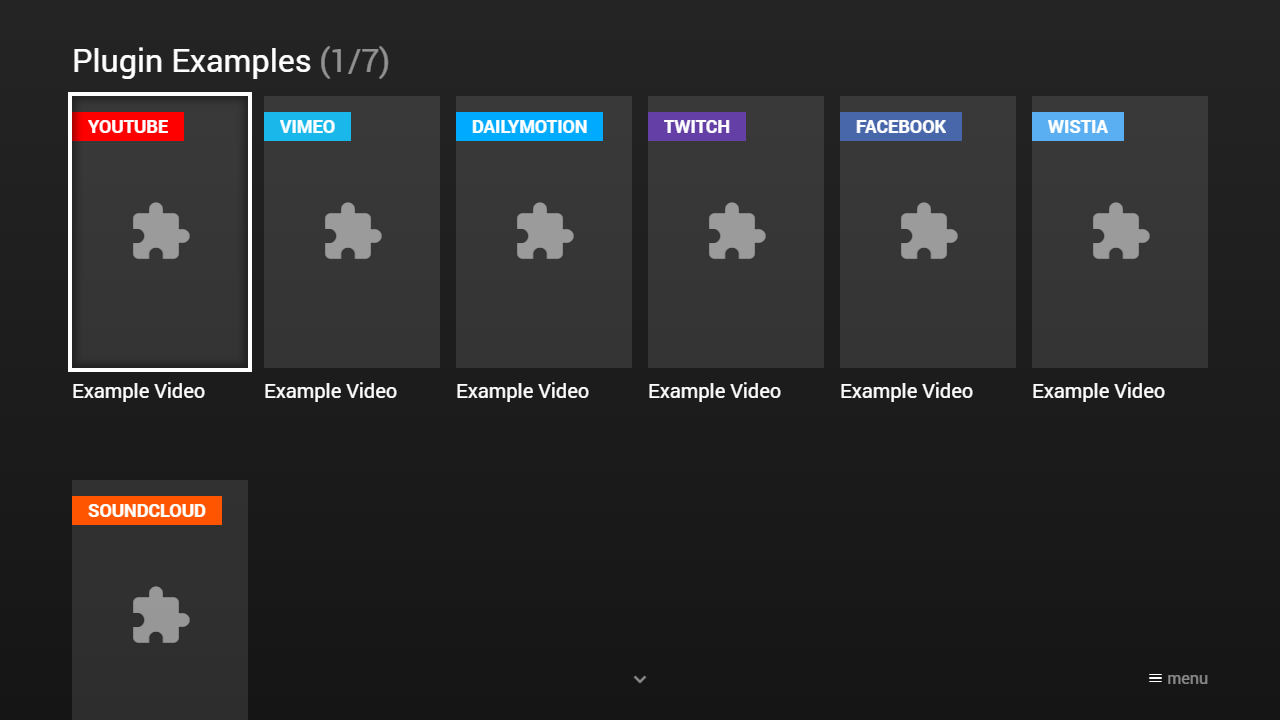
Code
{
    "type": "list",
    "headline": "Plugin Examples",
    "template": {
        "type": "separate",
        "layout": "0,0,2,4",
        "icon": "msx-white-soft:extension",
        "color": "msx-glass"
    },
    "items": [{
            "badge": "{txt:msx-white:YouTube}",
            "badgeColor": "#ff0000",
            "title": "Example Video",
            "playerLabel": "YouTube - Example Video",
            "action": "video:plugin:http://msx.benzac.de/plugins/youtube.html?id=PRy2CFVlPOA"
        }, {
            "badge": "{txt:msx-white:Vimeo}",
            "badgeColor": "#1ab7ea",
            "title": "Example Video",
            "playerLabel": "Vimeo - Example Video",
            "action": "video:plugin:http://msx.benzac.de/plugins/vimeo.html?id=54802209"
        }, {
            "badge": "{txt:msx-white:Dailymotion}",
            "badgeColor": "#00aaff",
            "title": "Example Video",
            "playerLabel": "Dailymotion - Example Video",
            "action": "video:plugin:http://msx.benzac.de/plugins/dailymotion.html?id=xz14c1"
        }, {
            "badge": "{txt:msx-white:Twitch}",
            "badgeColor": "#643fa6",
            "title": "Example Video",
            "playerLabel": "Twitch - Example Video",
            "action": "video:plugin:http://msx.benzac.de/plugins/twitch.html?id=344341752"
        }, {
            "badge": "{txt:msx-white:Facebook}",
            "badgeColor": "#4767aa",
            "title": "Example Video",
            "playerLabel": "Facebook - Example Video",
            "action": "video:plugin:http://msx.benzac.de/plugins/facebook.html?id=10152454700553553"
        }, {
            "badge": "{txt:msx-white:Wistia}",
            "badgeColor": "#5aaff2",
            "title": "Example Video",
            "playerLabel": "Wistia - Example Video",
            "action": "video:plugin:http://msx.benzac.de/plugins/wistia.html?id=ve7pzy0d3y"
        }, {
            "badge": "{txt:msx-white:SoundCloud}",
            "badgeColor": "#ff5500",
            "title": "Example Track",
            "playerLabel": "SoundCloud - Example Track",
            "action": "video:plugin:http://msx.benzac.de/plugins/soundcloud.html?id=143041228"
        }]
}
Demo
See Also
- Cookbook → Media lists — the
github/base/youtube.jsonstarting point for a plugin-based video list - Cookbook → Deep dive — a minimal “resume playback” item — remembering playback position (
resume:key) works through a plugin player likevideo:plugin:{URL}just as well as a plainvideo:{URL}item, as long as the plugin reports position/duration back to MSX - Extended Properties —
resume:key/resume:position/resume:contextand other per-item properties that apply to plugin-played items too - Live Object —
type: "playback"for showing live progress on a plugin-played item