msx-knowledge-base
Play Plugin
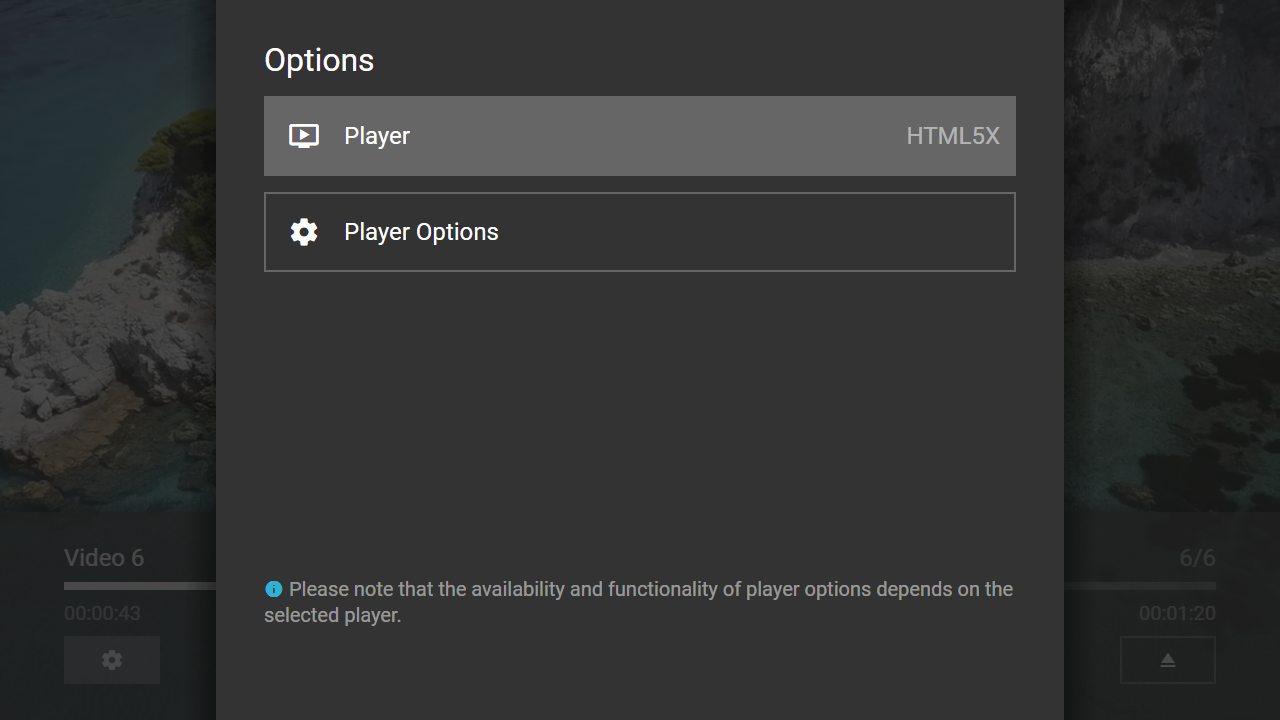
This is a special interaction plugin that allows you to select a platform-compatible player at runtime. Additionally, the settings of the selected player are made available. The plugin can be used with version 0.1.145 or higher.
Usage
The plugin must be loaded with a video URL. Optionally, the player button (to make the player selection available) can be indicated. Additionally, the related content button can be displayed in the player selection panel (e.g. if the player button is set to the content button). Please see following action syntax examples.
video:resolve:request:interaction:{URL}@http://msx.benzac.de/interaction/play.htmlvideo:resolve:request:interaction:{URL}@http://msx.benzac.de/interaction/play.html?button={BUTTON}&related={RELATED}
If you would like to use the plugin as reference to implement your own plugin, please have a look at this implementation script: http://msx.benzac.de/interaction/js/play.js.
Available Players
The plugin automatically picks a suitable default player for the given video/audio URL based on the current platform, while still letting the user manually switch to a different one via the player selection panel (opened with the button parameter below). The selection pool consists of:
http://msx.benzac.de/plugins/html5x.html?url={URL}— HTML5X Pluginhttp://msx.benzac.de/plugins/hls.html?url={URL}— HLS playbackhttp://msx.benzac.de/plugins/dash.html?url={URL}— DASH playbackhttp://msx.benzac.de/plugins/shaka.html?url={URL}— Shaka Playerhttp://msx.benzac.de/plugins/videojs.html?url={URL}— Video.jshttp://msx.benzac.de/plugins/android.html?url={URL}— Android Plugin
On platforms where it is available (newer Samsung Tizen models), the panel also offers the native Tizen Player plus its own interaction page, alongside the plugins above.
In effect, this makes any given video/audio URL playable through any of these players (or the underlying native player with its extra platform-specific capabilities), all from the same content item, without the JSON author having to hardcode a single plugin choice.
Syntax
Parameter syntax of play plugin.
| Parameter | Type | Default Value | Mandatory | Description |
|---|---|---|---|---|
button |
string |
"content" |
No | The player button that should be used to make the player selection available. |
related |
number |
0 |
No | Indicates if the related content button should be displayed in the player selection panel. - 0: Hides the related content button.- 1: Shows the related content button. |
Example
Screenshot
Code
{
    "type": "list",
    "headline": "Play Plugin Test",
    "template": {
        "type": "separate",
        "layout": "0,0,2,4",
        "icon": "msx-white-soft:extension",
        "color": "msx-glass",
        "titleFooter": "",
        "progress": -1,
        "live": {
            "type": "playback",
            "titleFooter": "{progress:time:hh:mm:ss}",
            "action": "player:show"
        },
        "properties": {
            "resume:key": "url"
        }
    },
    "items": [{
            "title": "Video 1",
            "playerLabel": "Video 1",
            "action": "video:resolve:request:interaction:http://msx.benzac.de/media/video1.mp4@http://msx.benzac.de/interaction/play.html"
        }, {
            "title": "Video 2",
            "playerLabel": "Video 2",
            "action": "video:resolve:request:interaction:http://msx.benzac.de/media/video2.mp4@http://msx.benzac.de/interaction/play.html"
        }, {
            "title": "Video 3",
            "playerLabel": "Video 3",
            "action": "video:resolve:request:interaction:http://msx.benzac.de/media/video3.mp4@http://msx.benzac.de/interaction/play.html"
        }, {
            "title": "Video 4",
            "playerLabel": "Video 4",
            "action": "video:resolve:request:interaction:http://msx.benzac.de/media/video4.mp4@http://msx.benzac.de/interaction/play.html"
        }, {
            "title": "Video 5",
            "playerLabel": "Video 5",
            "action": "video:resolve:request:interaction:http://msx.benzac.de/media/video5.mp4@http://msx.benzac.de/interaction/play.html"
        }, {
            "title": "Video 6",
            "playerLabel": "Video 6",
            "action": "video:resolve:request:interaction:http://msx.benzac.de/media/video6.mp4@http://msx.benzac.de/interaction/play.html"
        }]
}