msx-knowledge-base
Quick Start Guide
Introduction
This is a quick start guide to setup a local Media Station X server with example content by using Node.js and the http-server package.
Alternatively, if you have Media Station X 0.1.123 or higher, please see the showcase Node Browser MSX. This showcase is based on the same technology, but simplifies and speeds up the setup process.
See: Node Browser MSX
1) Setup HTTP Server
- Download and install Node.js: https://nodejs.org.
- Install the http-server package (via npm): https://www.npmjs.com/package/http-server.
- Create the folder http-server on your local machine (e.g.
c:\http-server). - Create the subfolder msx in this folder (e.g.
c:\http-server\msx).
2) Create Example Start Parameter
- Create the following start.json file in the msx folder (e.g.
c:\http-server\msx\start.json).
{
    "name": "My Example Content",
    "version": "1.0.0",
    "parameter": "menu:http://{SERVER}/msx/menu.json"
}
Note: Since version 0.1.65, the {SERVER} part is automatically replaced with the entered server. If you use an older version of Media Station X, you will need to do this manually. Please note that the auto-replacement feature only works for the start parameter file, for the other JSON files, you must always indicate full URLs (to avoid errors in cross-references). Since version 0.1.97, you can also indicate a {PREFIX} to automatically replace the used prefix (i.e. http:// or https://) (e.g. "menu:{PREFIX}{SERVER}/msx/menu.json" → "menu:http://192.168.0.10:8080/msx/menu.json").
3) Create Example Menu
- Create the following menu.json file in the msx folder (e.g.
c:\http-server\msx\menu.json).
{
    "headline": "My Example Content",
    "menu": [{
            "icon": "movie",
            "label": "My Example Movies",
            "data": {
                "type": "pages",
                "template": {
                    "type": "separate",
                    "layout": "0,0,2,4",
                    "icon": "msx-white-soft:movie",
                    "color": "msx-glass"
                },
                "items": [{
                        "title": "Video 1",
                        "action": "video:http://msx.benzac.de/media/video1.mp4"
                    }, {
                        "title": "Video 2",
                        "action": "video:http://msx.benzac.de/media/video2.mp4"
                    }, {
                        "title": "Video 3",
                        "action": "video:http://msx.benzac.de/media/video3.mp4"
                    }]
            }
        }, {
            "icon": "music-note",
            "label": "My Example Audios",
            "data": {
                "type": "pages",
                "template": {
                    "type": "separate",
                    "layout": "0,0,2,3",
                    "icon": "msx-white-soft:music-note",
                    "color": "msx-glass"
                },
                "items": [{
                        "title": "Audio 1",
                        "action": "audio:http://msx.benzac.de/media/audio1.mp3"
                    }, {
                        "title": "Audio 2",
                        "action": "audio:http://msx.benzac.de/media/audio2.mp3"
                    }, {
                        "title": "Audio 3",
                        "action": "audio:http://msx.benzac.de/media/audio3.mp3"
                    }]
            }
        }, {
            "icon": "image",
            "label": "My Example Images",
            "data": {
                "type": "pages",
                "template": {
                    "type": "default",
                    "layout": "0,0,3,2",
                    "color": "msx-glass",
                    "imageFiller": "cover",
                    "action": "image:context"
                },
                "items": [{
                        "image": "http://msx.benzac.de/img/bg1.jpg"
                    }, {
                        "image": "http://msx.benzac.de/img/bg2.jpg"
                    }, {
                        "image": "http://msx.benzac.de/img/bg3.jpg"
                    }]
            }
        }]
}
4) Start HTTP Server
- Open a command-line interface (e.g. Windows PowerShell).
- Navigate to the folder http-server (e.g.
cd c:\http-server). - Enter
http-server --corsto start the server. - Note the displayed IP address and port (e.g.
192.168.0.10:8080).
PS C:\> cd c:\http-server
PS C:\http-server> http-server --cors
Starting up http-server, serving ./
Available on:
  http://192.168.0.10:8080
  http://127.0.0.1:8080
Hit CTRL-C to stop the server
5) Setup Start Parameter
- Install and launch the Media Station X application.
- Navigate to Settings → Start Parameter → Setup.
- Enter the noted IP address and port (e.g.
192.168.0.10:8080). - Complete the setup.
- Browse and enjoy your content.
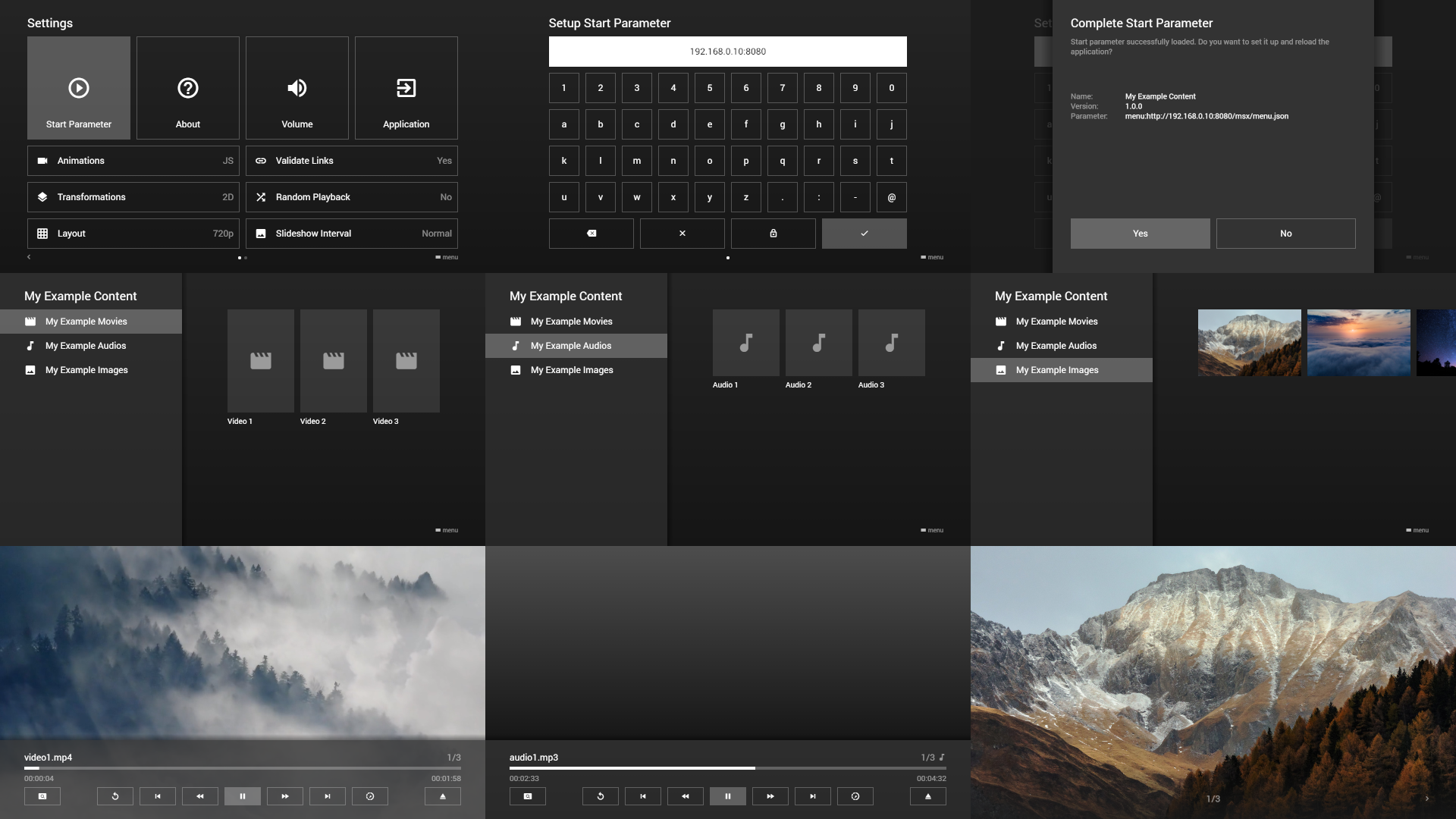
Note: Please make sure the device running the Media Station X application and your local machine are connected to the same network. Additionally, please make sure that your local machine has not configured a firewall that blocks incoming connections on the used port.